 View on GitHub
Accelerate Sonatype Nexus with Varnish Orca
Sonatype Nexus Repository is a Universal Repository Manager used by a large share of enterprises to host, proxy and govern build artifacts. It supports many formats: npm, PyPI, Docker, Maven, Helm, NuGet, raw, and more. It is shipped in two main flavours: a free Community Edition and a commercial Pro/Cloud offering.
This tutorial explains how Varnish Orca sits in front of Nexus as a specialized caching proxy to improve fetch performance, stay below Nexus’s scaling cliffs, and, for Nexus Cloud customers, directly reduce consumption-based egress charges.
It is the Nexus counterpart of the Accelerate JFrog Artifactory with Varnish Orca tutorial. The Orca-specific deployment and configuration sections are kept short here and link to that tutorial where the content is identical.
How Nexus exposes repositories
By default, Nexus serves every repository under the path /repository/<repo-name>/, regardless of format, whether it hosts your own artifacts, proxies a remote registry (e.g. registry.npmjs.org, Maven Central, Docker Hub), or groups several repositories behind one URL. Docker repositories can optionally be exposed via a dedicated port or subdomain connector instead. This tutorial assumes the default path layout.
A typical Nexus deployment ends up with a mix of all three, across several formats:
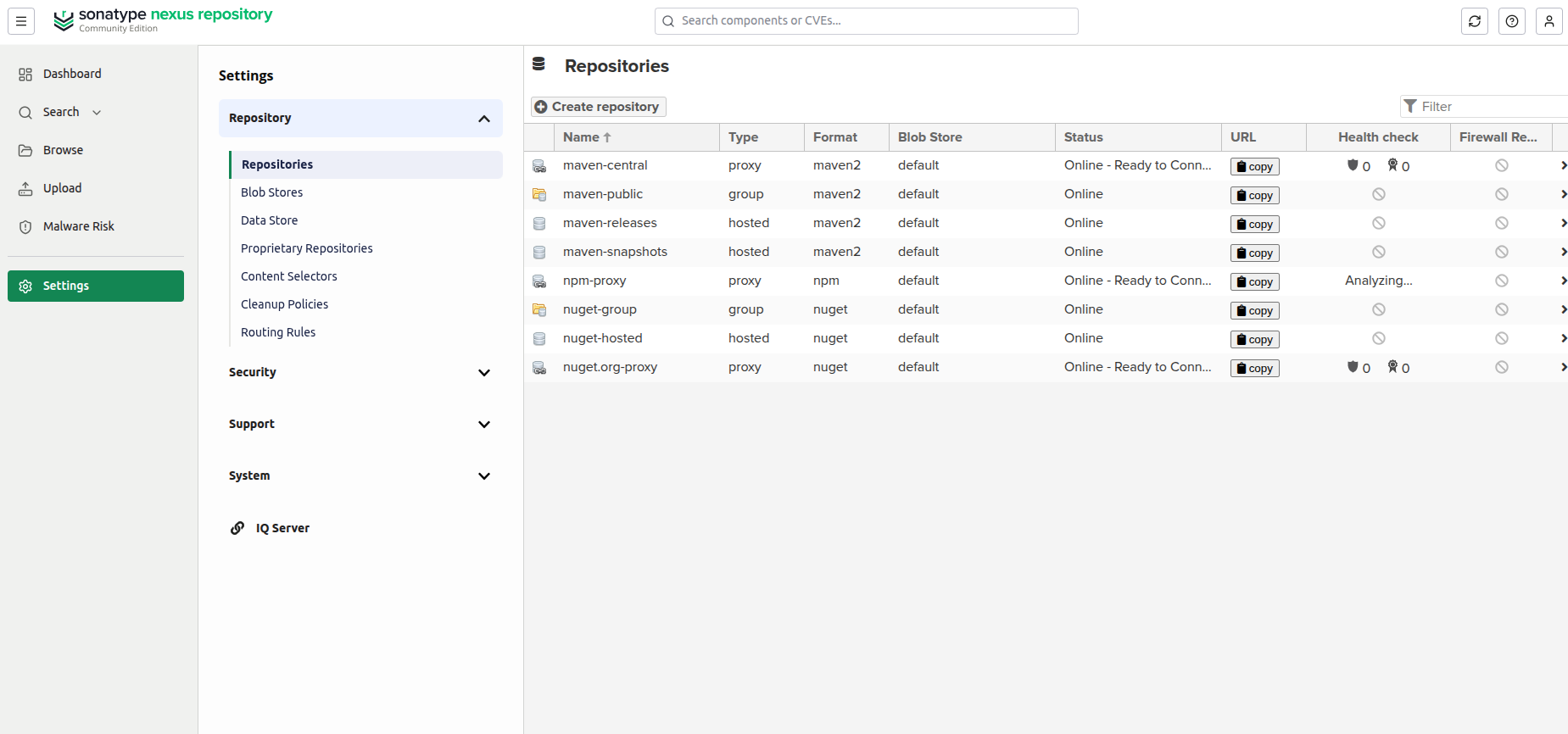
Clients fetch artifacts using their native tooling (npm install, mvn dependency:resolve, docker pull, helm install, and so on) by pointing the client at the matching /repository/<repo-name>/ URL.
Where Nexus hits a wall
Nexus makes its scaling limits visible to users. The Community Edition dashboard tracks usage against hard caps in real time:
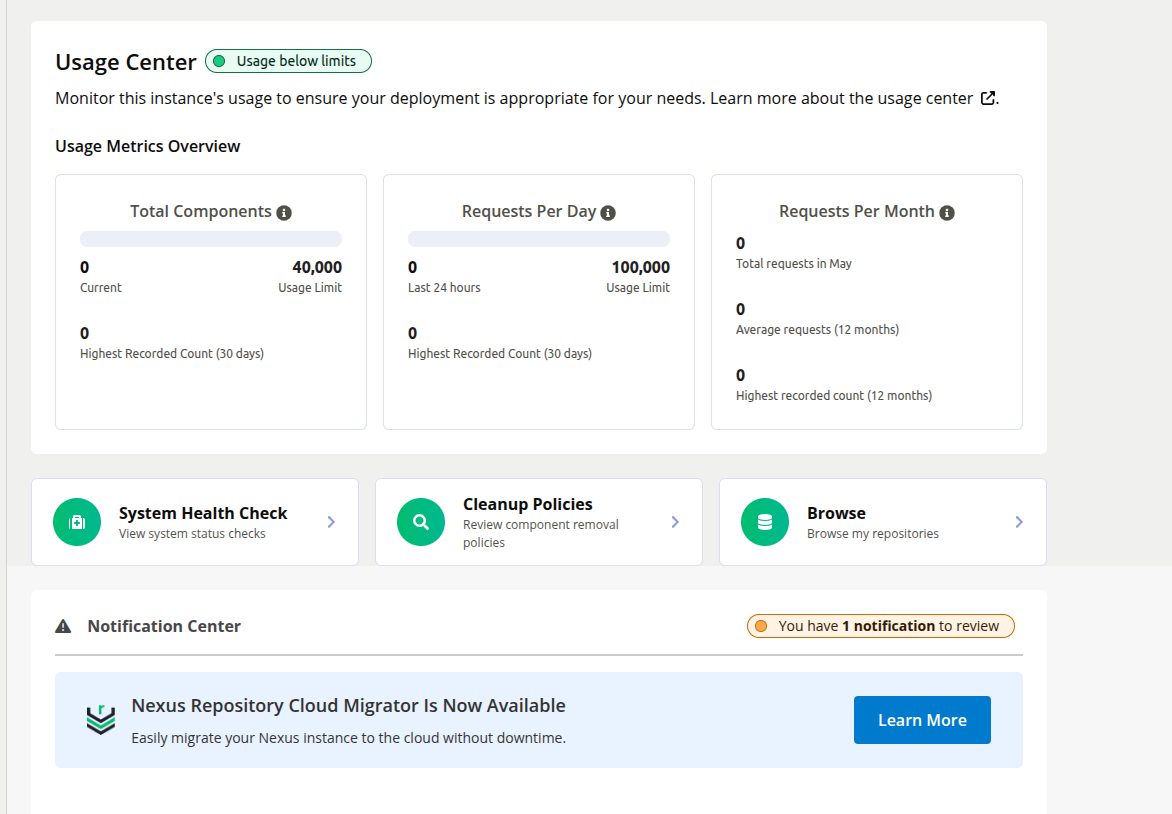
A default Community deployment is capped at 40,000 components and 100,000 requests per day. A busy CI/CD pipeline pulling hundreds of dependencies per build can burn through the request budget quickly. Once either limit is hit, Nexus pauses the addition of new components until usage drops back below both thresholds.
A few other bottlenecks compound the problem:
- I/O-bound, not CPU-bound: per Sonatype’s system requirements, Nexus performance is primarily bounded by disk and network I/O rather than CPU. Adding cores rarely helps. The only effective remedies are faster storage, a faster network, or fewer requests reaching Nexus in the first place.
- JVM tuning is fragile: per Sonatype’s memory overview, Nexus uses direct (native) memory much more than the Java heap, so over-sizing the heap degrades database performance and pushes the OS into swapping. Vertical scaling is not an “add more RAM” operation.
- Consumption-based pricing on Nexus Cloud: Sonatype’s hosted offering charges per-GB for storage and egress, so every cache miss becomes a line item on the next invoice.
Putting Orca in front of Nexus addresses all of these at once:
- It absorbs the request volume that would otherwise eat into the Community caps
- It takes the I/O hit on its own infrastructure instead of Nexus’s
- On Nexus Cloud it directly reduces the metered egress bill.
Adding Orca in front of Nexus
The architectural pattern is the same as for any upstream registry. Clients fetch from Orca. Orca serves from cache when it can. On a miss, it fetches from Nexus and caches the response on the way back.
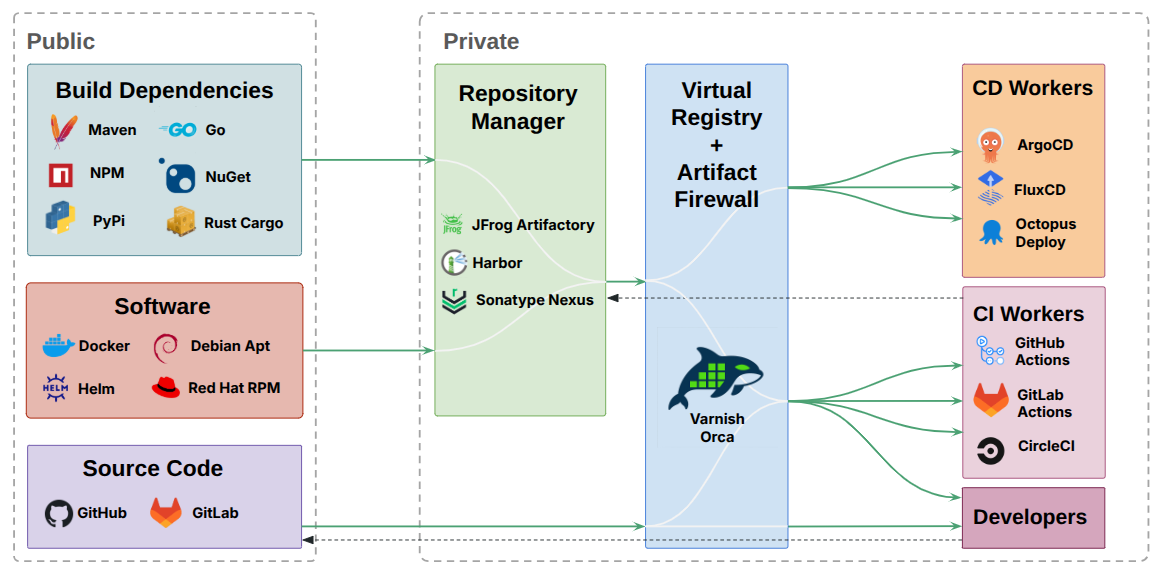
Orca is protocol-native and vendor-neutral: it understands every repository manager that speaks the standard package-format HTTP APIs (Nexus, JFrog Artifactory, Harbor), the difference between mutable manifests and immutable layers, follows the redirects that registries issue for proxied storage, and rewrites response headers so downloads stay on the Orca path. The result is a much higher cache hit ratio than a naive HTTP cache could achieve.
Verifying the cache locally
Before configuring production hostnames and TLS, it’s worth seeing the cache work end-to-end. The easiest way is to bring up Nexus and Orca side by side with Docker Compose, using the official Nexus image and the official Orca image.
docker-compose.yaml:
services:
  nexus:
    image: sonatype/nexus3
    ports:
      - "8081:8081"

  orca:
    image: varnish/orca:latest
    ports:
      - "8888:80"
    volumes:
      - ./config.yaml:/app/config.yaml:ro
    command: --config /app/config.yaml
    depends_on:
      - nexus
config.yaml:
virtual_registry:
  registries:
    - name: nexus
      default: true
      remotes:
        - url: http://nexus:8081
Bring both up with docker compose up -d. Nexus takes 60 to 90 seconds to boot on first start. Once it is up, grab the initial admin password:
docker compose exec nexus cat /nexus-data/admin.password
Log in to http://localhost:8081 as admin with that password, walk through the setup wizard, and create a proxy repository:
- Repository type: npm (proxy)
- Name:
npm-proxy - Remote storage:
https://registry.npmjs.org
Then point a real npm client at Orca and run the same install twice.
Set up a scratch project directory and tell npm to use Orca as its registry:
mkdir demo_install && cd demo_install

export NPM_CONFIG_REGISTRY=http://localhost:8888/repository/npm-proxy/
The NPM_CONFIG_REGISTRY env var routes every npm install in this shell through Orca. In production you’d set it in a project’s .npmrc, via npm config set registry, or through a shell profile, but an env var is enough for this demo.
The first npm install is a cache miss. Orca has to ask Nexus, which in turn proxies both the package metadata and the tarball from the upstream npm registry, so the request makes a full round-trip out to the internet:
$ time npm install lodash

added 1 package in 851ms

real	0m0.903s
Reset the local project so npm actually re-fetches on the next run rather than short-circuiting on the existing lockfile, then run again:
$ rm -rf node_modules package-lock.json package.json && npm cache clean --force
$ time npm install lodash

added 1 package in 289ms

real	0m0.352s
Orca’s varnishlog shows what changed between the two runs. Open a second terminal before you kick off the installs and stream requests as they arrive:
docker compose exec orca varnishlog -g request
(Or run docker compose exec orca varnishlog -g request -d afterwards to read whatever records are still in Varnish’s in-memory log buffer.)
The first run fetches everything from Nexus:
GET /repository/npm-proxy/lodash                    (packument, 244 KB)
    VCL_call     MISS
    Link         bereq 3 fetch
    BackendOpen  nexus.udo.nexus_dir_1:8081
    BerespStatus 200 OK
    Length       249541 bytes

GET /repository/npm-proxy/lodash/-/lodash-4.18.1.tgz    (tarball, 308 KB)
    VCL_call     MISS
    Link         bereq 5 fetch
    BackendOpen  nexus.udo.nexus_dir_1:8081 reuse
    BerespStatus 200 OK
    Length       315640 bytes
The second run splits by resource type. The packument (metadata) is short-cached and revalidated with Nexus on each request. Nexus responds 304 Not Modified with an empty body: a fast round-trip, no bytes transferred:
GET /repository/npm-proxy/lodash                    (packument)
    VCL_call     MISS
    BereqHeader  If-None-Match: W/"c6f2..."
    BerespStatus 304 Not Modified
    Content-Length: 0
The tarball is served entirely from Orca’s cache. Nexus is never contacted:
GET /repository/npm-proxy/lodash/-/lodash-4.18.1.tgz    (tarball)
    VCL_call     HIT
    Hit          5                                 ← reuses object from run 1
    X-Varnish:   2052 5                            ← two numbers = cache hit
    Age:         67                                ← cached 67 seconds ago
    (no backend request)
This is exactly what you want for a package registry. Metadata stays fresh via cheap revalidation, so newly published versions show up immediately. Immutable content (tarballs pinned to a version) is served from Orca’s memory in under a millisecond after its first fetch.
The savings scale with your dependency graph. Every tarball fetched once by any client is available to every subsequent client, developer laptop, CI runner, or container build at LAN latency from Orca’s cache.
Configuring Orca for Nexus
A minimal Orca configuration that fronts a single Nexus instance looks like this:
varnish:
  https:
  - port: 443
acme:
  email: user@domain.com
  domains:
    - nexus.orca.example.com
  ca_server: production
license:
  file: /app/license.lic
virtual_registry:
  registries:
  - name: nexus
    default: true
    remotes:
    - url: https://nexus.example.com
The only Nexus-specific concern is the remotes.url value: point it at your Nexus base URL, and Orca will transparently proxy every /repository/<repo-name>/ path underneath it.
For the TLS, ACME and license sections, refer to the equivalent sections of the JFrog Artifactory tutorial. The configuration is identical for any upstream registry.
Want to try the premium features? Request a free trial license.
Request a free premium trial license →Deploying Orca
Orca ships as a Docker image, an official Helm chart, and DEB/RPM packages. See the install guide for the full set of options.
The deployment patterns that work well for Nexus are the same three patterns covered in the Artifactory deployment section:
- In-cluster: Orca runs as a pod in the same Kubernetes cluster as your CI runners
- Co-located: Orca runs on a Linux host close to a centralized CI/CD pipeline
- Local: Orca runs as a container on a developer machine for offline-resilient fetching
The benefit profile is identical: less load on Nexus, lower network latency, and, critically for Nexus Cloud, lower egress.
Pointing your clients at Orca
The cleanest cutover is a DNS change: repoint nexus.example.com from your Nexus instance to your Orca instance, and every client transparently goes through Orca with no configuration change. Where DNS changes are not practical, clients can be pointed at Orca explicitly.
Every Nexus repository surfaces its canonical URL on its settings page (Settings → Repositories → click the repository name). That URL is the path clients should target:
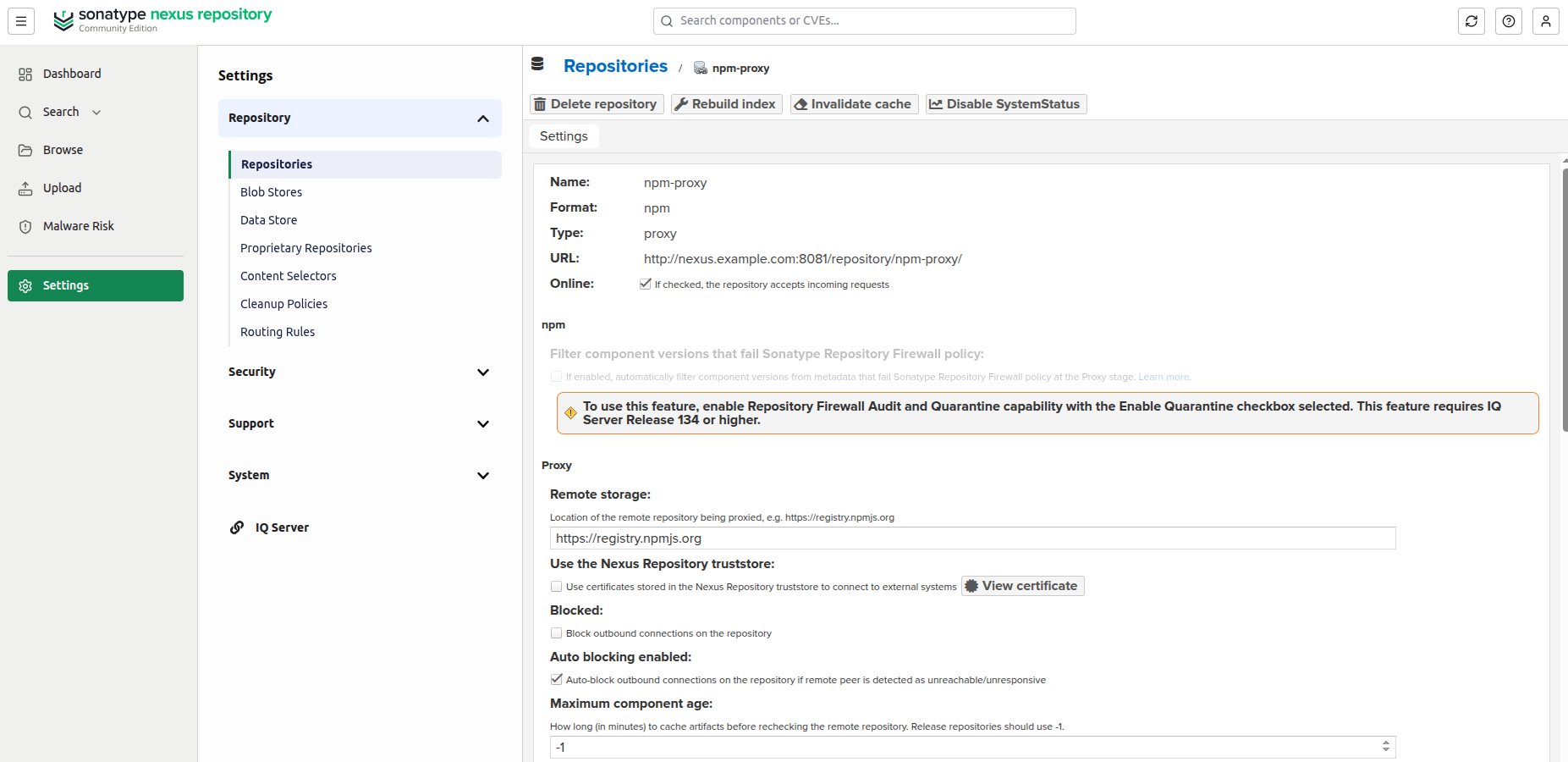
In production the URL should use HTTPS.
For npm against the npm-proxy repository created above, this becomes:
npm install --registry=https://nexus.orca.example.com/repository/npm-proxy/
For other ecosystems, refer to our client configuration tutorials.
Next steps
- Configure TLS for production traffic
- Register a custom license to enable premium features
- Run Orca in Kubernetes alongside Nexus
- Review the full configuration reference