 View on GitHub
Offload traffic from JFrog Artifactory with Varnish Virtual Registry
JFrog Artifactory is a Universal Repository Manager that stores and delivers artifacts as part of the software supply chain. Artifactory provides private registries with centralized management and access controls for a large variety of artifact types.
Although Artifactory provides significant value to organizations, it also comes with some unique operational challenges. In a previous tutorial, we explained how Varnish Virtual Registry can improve the performance and scalability of a JFrog Artifactory setup.
How to access registries in Artifactory?
The image below shows the various registries that were created, each for a different artifact type.
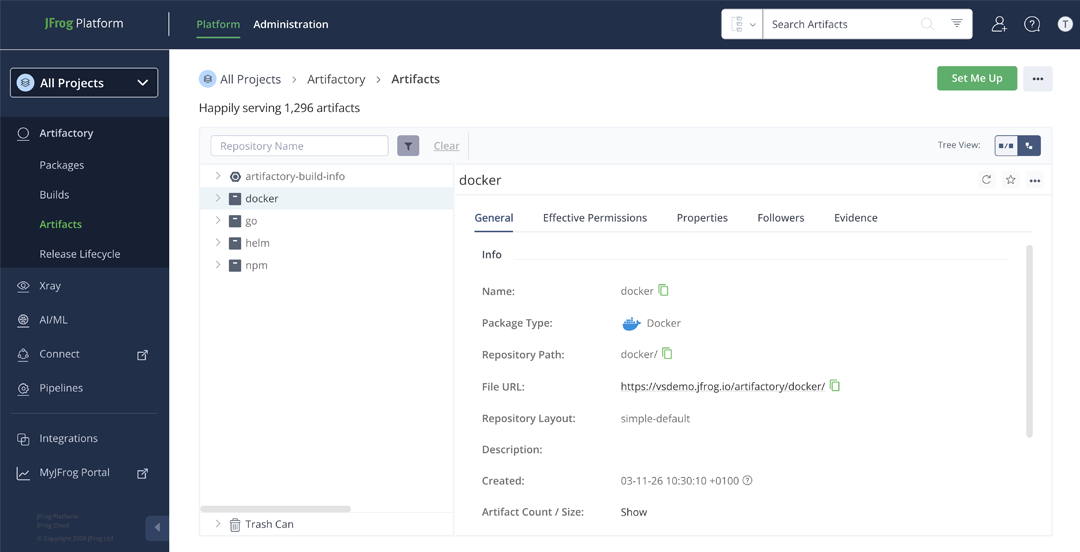
These artifacts can be fetched with a docker pull, an npm install, a helm install, or a go get.
JFrog Artifactory: self-hosted vs SaaS
JFrog Artifactory supports a wide variety of artifact types and serves many parts of the software supply chain.
As discussed in the Artifactory performance and scalability tutorial, operating a large-scale Artifactory deployment that delivers all these dependencies puts significant pressure on the platform, which leads to performance and scalability issues on self-hosted setups.
To address these issues, JFrog offers a cloud-hosted SaaS version of the product. It simplifies operations and typically delivers better performance through horizontal scalability.
The tradeoff of storing artifacts in the cloud is the reliance on the external network, both in terms of latency and cost.
The table below summarizes the typical issues associated with each deployment model:
| Self-hosted Artifactory | SaaS platform |
|---|---|
| Performance | Network latency |
| Scalability | Egress charges |
| Infrastructure | Cloud outages |
JFrog Cloud network challenges
As shown in the table above, network latency and egress charges are the primary challenges of running JFrog Artifactory in the cloud.
JFrog Artifactory SaaS can be deployed on AWS, Google Cloud, or Microsoft Azure, and you choose the region your instance runs in. The distance between that instance and its consumers (CI workers, CD workers, deployment targets, and developers) is often the main source of network latency. This is not exclusive to JFrog SaaS: any self-hosted setup where Artifactory is too far from its consumers suffers from the same issue.
Each JFrog SaaS package comes with its own traffic allowance. Pro includes 25 GB, and Enterprise X includes 125 GB. At any reasonable scale, you quickly exceed these limits and pay overage charges of $0.75 to $1.25 per gigabyte, which add up fast.
On top of latency and cost, your Artifactory instance is also exposed to cloud outages. When the underlying cloud region or the JFrog SaaS platform itself becomes unavailable, builds, deployments, and developer workflows will fail. Unlike a self-hosted setup where you control the recovery path, with SaaS you are at the mercy of the provider.
Keeping artifacts as close to consumers as possible reduces latency, dramatically cuts egress charges, and keeps your pipelines running even when the upstream is unreachable. That is where a virtual registry makes the difference.
Adding a virtual registry
A virtual registry is the perfect solution for reducing reliance on an external network when serving artifacts at scale: it is positioned close to the consumers and serves cached versions of the artifacts.
As the diagram below illustrates: Varnish Virtual Registry (Orca) can be added in front of JFrog Artifactory as a highly specialized reverse caching proxy.
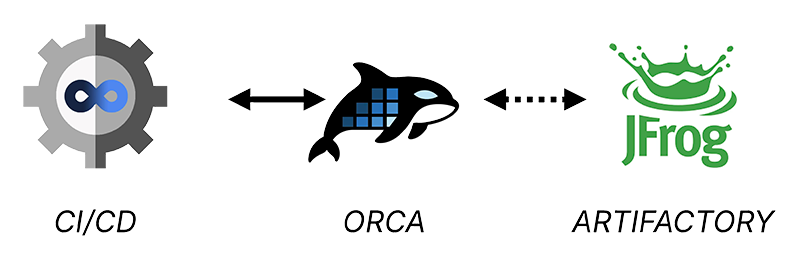
Clients now request artifacts directly from the Varnish Virtual Registry instead of Artifactory. If an artifact is found in the cache, the virtual registry delivers it immediately; if not, it fetches the artifact from Artifactory in the cloud.
The Varnish Virtual Registry (Orca) is built on top of Varnish Enterprise and is optimized to handle artifacts in a protocol-native way:
- It detects artifact types based on client request headers and the URL
- It knows how to handle manifests for the different artifact types
- It is optimized to cache the underlying files and layers of the different artifact types
- It can enforce JFrog Artifactory’s access controls without cache duplication
Deploying Varnish Virtual Registry (Orca)
The Varnish Virtual Registry (Orca) is easy to install and deploy:
- We offer an official Docker image
- You can orchestrate that Docker image with our official Helm chart
- You can install Orca on Linux servers using our DEB and RPM packages
Have a look at our install guide for more information.
When offloading traffic from JFrog Artifactory SaaS, we often talk about hyperlocalization: positioning your virtual registry as close to the consumers as possible.
The diagram below shows a multi-site deployment where Orca instances are strategically placed:
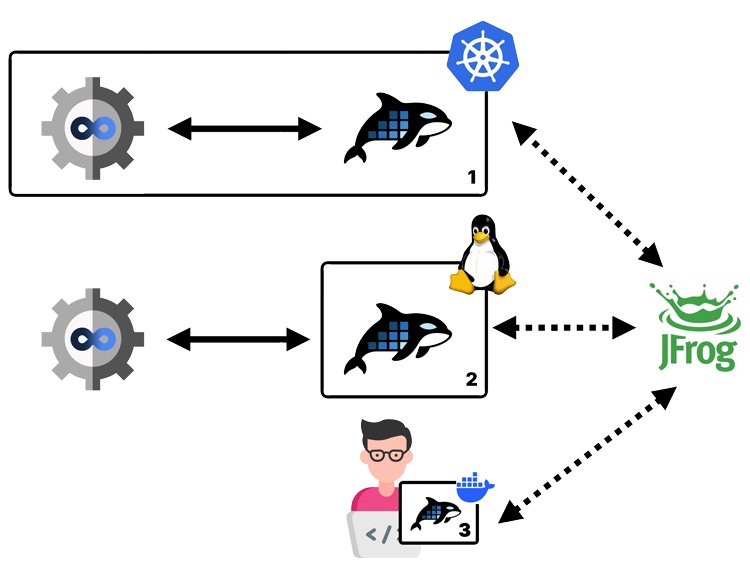
- An Orca instance deployed in the same Kubernetes cluster as a self-hosted CI runner
- An Orca instance installed on a Linux machine next to a centrally hosted CI/CD pipeline
- An Orca instance running in a Docker container on a developer’s computer
Each instance sits where artifact usage is heaviest. By serving artifacts from a cache on the same network or even the same cluster, builds and deployments run faster, network latency stops being a factor, and egress charges drop dramatically.
Configuring Orca
Configuring Orca is straightforward and only requires a single config.yaml file.
The Orca configuration documentation is the reference for this config file. The install guide explains how to deploy that configuration file.
Here’s an example of an Orca config file that offers support for JFrog Artifactory:
varnish:
  https:
  - port: 443
acme:
  email: user@domain.com
  domains:
    - artifactory.orca.example.com
  ca_server: production
license:
  file: /app/license.lic
virtual_registry:
  registries:
  - name: artifactory
    default: true
    remotes:
    - url: https://vsdemo.jfrog.io
TLS configuration
This hypothetical config file is available on port 443 for HTTPS traffic. The TLS certificate for artifactory.orca.example.com is requested via LetsEncrypt.
Have a look at the TLS configuration tutorial for more information.
License configuration
Some of the premium features in Varnish Orca require a commercial license. The example config loads that license from /app/license.lic on disk.
Have a look at the custom license registration tutorial for more information.
Want to give the premium features a try? Request a free premium trial license.
Request a free premium trial license →Virtual Registry configuration
The example configuration only has a single virtual registry entry, which points to https://vsdemo.jfrog.io, which is the hypothetical hostname of your JFrog Artifactory SaaS service.
The default: true setting ensures that any request on the Orca server will end up reaching Artifactory, even if the hostname does not contain artifactory.*.
Have a look at the virtual registry configuration section of the documentation for more information.
Fetching your artifacts from Orca
Now that Varnish Orca is deployed and configured, you can fetch artifacts from it.
If you have a custom domain attached to your JFrog SaaS subscription in the cloud, you can change the DNS record of your Artifactory endpoint to the IP address of your Orca setup. The process will be transparent. If that’s not the case, you need to reconfigure your artifact clients.
We have a list of client configuration tutorials that explains how to configure your client to fetch artifacts from Orca.
But here are a couple of common examples.
NPM example
To fetch NPM packages from Orca, simply add a --registry option that points to Orca:
npm install --registry=https://artifactory.orca.example.com
Have a look at our NPM client configuration tutorial for more information.
Go example
Similarly, for Go you can set the GOPROXY environment variable to the endpoint of Orca:
GOPROXY=https://artifactory.orca.example.com go mod tidy
Have a look at our Go client configuration tutorial for more information.
Docker example
And for Docker images, you could re-tag and push your images:
docker tag vsdemo.jfrog.io/docker/todo artifactory.orca.example.com/docker/todo

docker push artifactory.orca.example.com/docker/todo
This assumes you have an Artifactory registry for Docker named docker that is hosted on vsdemo.jfrog.io. The todo image is re-tagged to artifactory.orca.example.com/docker/todo and pushed to Artifactory via Orca on https://artifactory.orca.example.com.
You can then pull the image as follows:
docker pull artifactory.orca.example.com/docker/todo
You can also configure your Docker daemon to use Orca as a registry mirror, instead of re-tagging your images. We have a Kubernetes tutorial that explains how to re-configure containerd and use the Orca endpoint as a registry mirror.